
PayByPhone
PayByPhone Technologies Inc .Auto & Vehicles
4.910.23K Reviews
- Version
- 26.11.1
- Installs
- 10.00M
- Age Rating
- Everyone
Screenshots

Our Review of PayByPhone
 Analysis by Appyee
Ever found yourself scrambling for loose change or a working card machine when parking? Well, I have, and let me tell you, it’s not a fun experience. Enter PayByPhone, an app that promises to make parking as simple as a few taps on your phone. Let’s dive in and see if it’s really all it’s cracked up to be.
What Is PayByPhone?
So, PayByPhone is this nifty little app that lets you pay for parking without the hassle of cash or cards. The idea is to make parking payments quick and stress-free, all while helping you avoid those pesky parking fines. It’s available on both Android and iOS, so no one’s left out of the party.
Setting Up the App
Getting started with PayByPhone is a breeze. You download the app from the Google Play Store or Apple’s App Store, and you’re pretty much halfway there. Once installed, you’ll need to create an account, which is as simple as entering your email, creating a password, and verifying your phone number. The app will then ask for your vehicle information. Don’t worry, this part’s quick and painless.
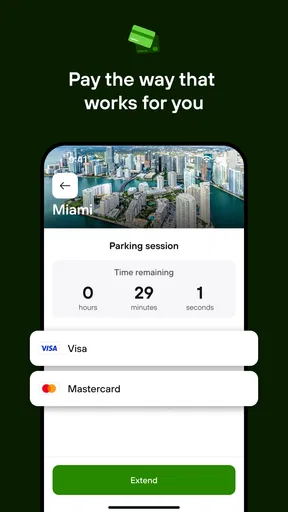
Next up is linking a payment method. You can choose between a credit card or even PayPal if that’s more your speed. I went with my trusty credit card, and the process was smooth sailing. Now, you’re ready to park like a pro!
Using PayByPhone for Parking
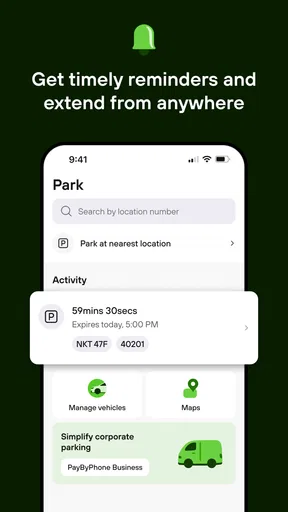
Once you’re all set up, using the app is straightforward. When you pull up to a parking spot, you’ll notice a location code on the parking meter or nearby sign. Punch this code into the app, select how long you want to stay, and hit confirm. Boom, you’re parked! The app even lets you extend your parking time remotely if you’re running late. No more sprinting back to the car to feed the meter.
One feature I absolutely love is the notifications. PayByPhone sends you reminders before your parking session expires, so you can avoid those dreaded tickets. It’s like having a personal assistant keeping tabs on your parking.
User Interface and Experience
The app’s interface is clean and intuitive, which is always a plus in my book. Everything is where you’d expect it to be, and the colors are easy on the eyes. Navigating through the app feels natural, and the loading times are impressively quick. It’s clear the developers put a lot of thought into the user experience.
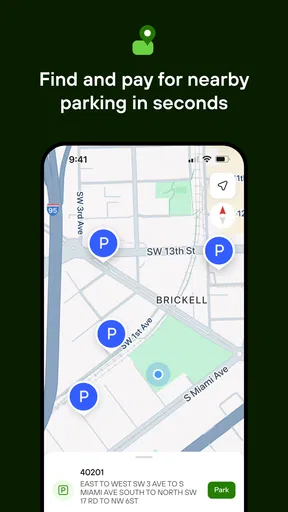
Additionally, the app offers a handy map feature that shows available parking locations nearby. It’s perfect for those times when you’re in an unfamiliar area and need to find parking without circling the block a million times.
Security and Privacy
In today’s digital age, security is a big deal, and PayByPhone doesn’t skimp on it. The app uses encryption to protect your payment information, and their privacy policy is transparent about how your data is used. As someone who values their privacy, I appreciate the extra steps they’ve taken to keep my information safe.
Final Thoughts
All in all, PayByPhone is a game-changer for anyone tired of traditional parking methods. It’s convenient, user-friendly, and takes the guesswork out of paying for parking. Sure, it’s not perfect—like any app, it’s reliant on having a good internet connection—but the benefits far outweigh the occasional hiccup.
If you’re looking to simplify your parking experience and say goodbye to parking fines, give PayByPhone a try. It might just become your new favorite app.
Privacy and Permissions
See what permissions an app requests and how it handles your data.
- Location
- approximate location (network-based), precise location (GPS and network-based)
- Photos/Media/Files
- read the contents of your USB storage, modify or delete the contents of your USB storage
- Storage
- read the contents of your USB storage, modify or delete the contents of your USB storage
- Camera
- take pictures and videos
- Other
- view network connections, expand/collapse status bar, full network access, run at startup, control vibration, prevent device from sleeping, read Google service configuration
Verdict
Strengths of PayByPhone
- Easy to use with a clean interface.
- Supports multiple payment methods.
- Send reminders for expiring sessions.
- Secure transactions with encryption.
- Wide coverage in major cities.
Limitations of PayByPhone
- Limited to specific parking areas.
- Occasional app crashes reported.
- No offline parking history access.
- Requires data connection for use.
- Limited customer support options.
Similar Picks in This Category
View All
Android Auto
Google LLC4.1

maxim — order a taxi & food
PT. SITO4.7

Штрафы ГИБДД: проверка с фото
Pays LLC – Штрафы ГИБДД4.7

Номерограм – проверка авто
Авто Ассист4.8

Дром Авто
Дром4.9

Frequently Asked Questions
What is PayByPhone and how does it work?
PayByPhone is a mobile payment app that allows users to pay for parking conveniently through their smartphone. Once you download the app, you can register your vehicle, select your parking location, and pay with a credit or debit card. The app sends reminders before your parking session expires, and you can extend your time remotely if needed.
Is PayByPhone available in my city or region?
PayByPhone is available in numerous cities and regions worldwide. To check if your area supports PayByPhone, visit their website or open the app and use the location search feature. The app will display a list of available parking locations near you, ensuring you can use the service where you need it.
Are there any additional fees for using PayByPhone?
While PayByPhone itself is free to download and use, some locations may charge a convenience fee for mobile payments. This fee varies by location and is usually a small percentage of the parking cost. It’s best to check the app for specific fee information for your parking area before proceeding with payment.
How secure is my payment information with PayByPhone?
PayByPhone uses advanced encryption and security measures to protect your payment information. Your credit card details are not stored on your device and are securely processed through trusted payment gateways. Additionally, the app complies with industry standards and regulations to ensure your data remains safe and private.
What should I do if I encounter issues while using PayByPhone?
If you experience any issues using PayByPhone, you can contact their customer support through the app or website. They offer assistance via phone, email, and sometimes live chat, depending on your region. Additionally, their website features a helpful FAQ section and troubleshooting guides to resolve common problems.
